Step 1: Creating a New JDeveloper Workspace and Project

Previous topic
Previous
Next topic
Next

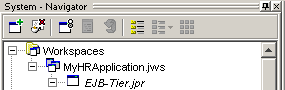
Before you start creating EJBs, you need to create a new workspace and project. Putting all your files into one project makes browsing packages easier and simplifies deployment.

To create a new workspace and project:

  1. In the Navigator, right-click on the Workspaces node and choose New Workspace.
  2. Without changing the path, change the Directory Name to MyHRApplication.
  3. Change the Workspace Name to MyHRApplication.
  4. Click OK.
    The New Project dialog opens.
  5. Without changing the path, change the Directory Name to EJB-Tier.
  6. Change the Project Name to EJB-Tier.

To set project preferences:

  1. In the Navigator, right-click your project node (EJB-Tier.jpr) and choose Project Settings.
  2. In the Default Package field, enter hr.
  3. Click OK.
  4. From the File menu, choose Save All.