Step 2: Adding a Method to the Session Bean

Previous

Next
Step 2: Adding a Method to the Session Bean |
Previous |
Next |
In this step, you'll add a new method to the session bean called listDepartments().
This method will call the default-generated findAll() method on
the Dept entity bean.
To add a method to the session bean:
listDepartments() : String.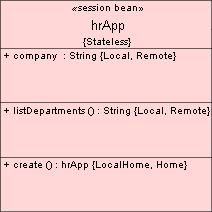
  public String listDepartments()
  {
    try {
	Collection col = getDeptLocalHome().findAll();
	Iterator it = col.iterator();
	StringBuffer sb = new StringBuffer ("Department Listing ....\n");
	DeptLocal dept;
	while(it.hasNext())
	  {
		dept = (DeptLocal)it.next();
    sb.append(dept.getDepartment_id() + "....." +
              dept.getDepartment_name()+ "....." +
              dept.getLocation_id() + ".....\n");

	  }

	return sb.toString();
       }
  catch(NamingException ne)
    {
	System.out.println(ne.toString());
	throw new javax.ejb.EJBException(ne);
    }
  catch(FinderException fe)
    {
  System.out.println(fe.toString());
  throw new javax.ejb.EJBException(fe);
     }
  }
import javax.ejb.FinderException;
import java.util.Collection;
import java.util.Iterator;
import hr.DeptLocal;