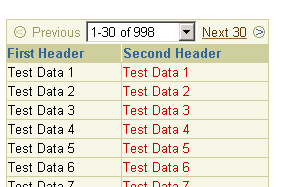
In a table where a subset of a large set of data is displayed, a record navigation bar displays the user's current position among a block of records while allowing the user to navigate back and forth through the records via generated links.
For a table to render a navigation bar, you must set the following attributes on the table:
blockSize - Specifies the number of rows to display in a
normal subset
value - Specifies the first index currently displayed in
the table
In addition you can also set the minValue and maxValue attributes to specify the first and last possible values in the range of data displayed.
The links in the record navigation bar are generated URLs based on the destination attribute of the table. When the user clicks a link, the table generates a goto event with the following URL parameters:
blockSize of
the table.
If the formSubmitted attribute on the table is set to true, then form submission links will be generated instead. As a result, the following hidden fields are set in the form in which the table resides:
When showAll is enabled in the table, a "Show All" option is displayed in the record navigation bar. This is only used if the maxValue attribute is set. If the number of row blocks is too large, showAll is automatically disabled.
About Table and its Named Children
Enabling a Record Navigation Bar for
a Table
Working with Table
Components
Copyright © 1997, 2004, Oracle. All rights reserved.