Performing Gap-Fit Analysis
Customizing the Predefined ORDM Data Mining Models for MeddWebb (continued)
Currently, for Item Basket mining models, the input data for the model building comes from the ITEM_BASKET_SRC table.
Need to Change Source Data Mining Data Granularity from Item to Subclass Level
With the default model at Item level, the source data mining data table ITEM_BASKET_SRC contains columns/attributes related to item level only (plus primary key fields and several measures). Generally, for data mining the requirement is that the input data should be available at the most granular level. Therefore, you cannot change the granularity of the data for bringing a change in the model (for going one level upward).
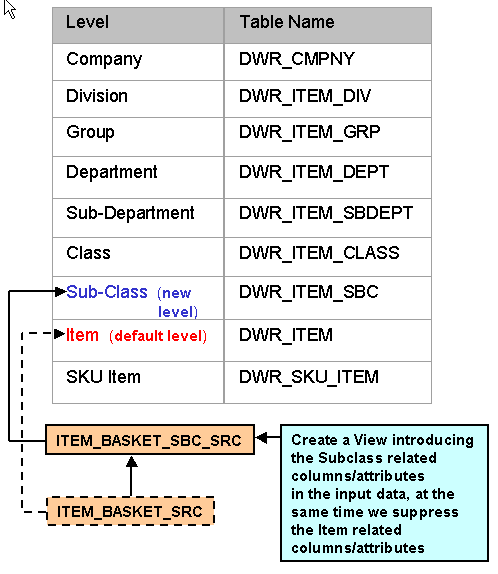
You need to introduce the Subclass-related columns/attributes in the input data, while at the same time you need to suppress the Item-related columns/attributes from the data mining engine during the model building, so that the mining rules can be discovered at the subclass level.
Create View to Add Subclass-Related Columns/Attributes and Suppress Item-Related Columns/Attributes
In order to achieve this, define an ITEM_BASKET_SBC_SRC view based on the existing source table ITEM_BASKET_SRC, keeping the data granularity the same as before. This newly defined ITEM_BASKET_SBC_SRC view will be used as the source for the modified models.
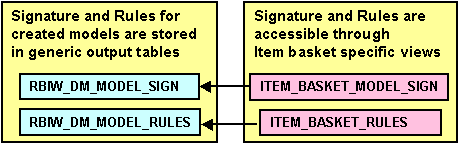
(Background Note: The Signature and Rules for the created models are stored in generic output tables RBIW_DM_MODEL_SIGN and RBIW_DM_MODEL_RULES, respectively, and they are accessible through the item basket specific views ITEM_BASKET_MODEL_SIGN and ITEM_BASKET_RULES, respectively.)